
 English


2025/07/14Views(37988)Reviews(0)
SellerSpace's advertising system automatically synchronizes all your store's advertising data, including Sponsored Products (SP), Sponsored Brands (SB), and Sponsored Display (SD). Sellers can completely bypass Amazon Seller Central and perform all advertising analysis and campaign management directly within SellerSpace.
I. First-Time Use
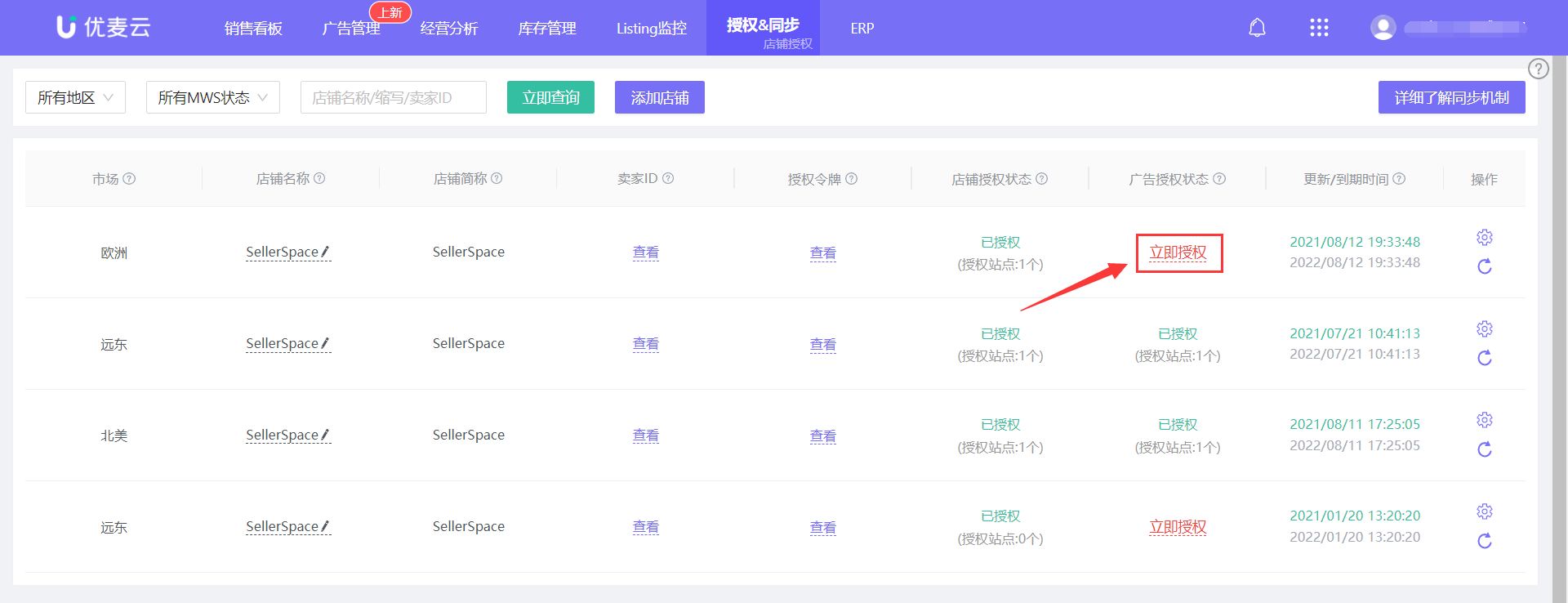
When using SellerSpace's advertising system for the first time, you need to authorize advertising access. Click here to see how to authorize
 +
+
II. Data Synchronization Frequency
1. After successful ad authorization, advertising data from the last 60 days is typically synchronized from Amazon within 2-3 hours. Therefore, the data in the advertising module will quickly display normally and be included in expenditure items.
2. After the synchronization of data from the last 60 days is complete, ad data from the last 2 days will be updated approximately every 30-60 minutes. Ad data from the last 3-60 days will be updated once a day, referencing the Amazon advertising attribution window.
3. If you adjust your advertising in Amazon Seller Central, such as bids, budgets, or Enable/Pause, the data will be synchronized to our backend within approximately 12 hours. You can also manually synchronize immediately. Operation path: Corresponding advertising module -> Batch Operations -> Synchronize Budget/Bid or Status.
4. If you add new campaigns, Ad groups, promoted products, keyword targeting, or non-keyword targeting in Amazon Seller Central, the system will not immediately synchronize the update. Updates will only occur when the ad object receives impressions. You can also manually synchronize directly.
Operation path: Corresponding advertising module -> Batch Operations -> Synchronize New from Amazon.
Therefore, it is recommended that you directly add and adjust advertising in our backend. Data is synchronized to Amazon Seller Central almost in real-time, which is convenient and fast.
III. Advertising System Structure
SellerSpace's advertising system automatically synchronizes all your store's advertising data through the official Amazon Advertising API.
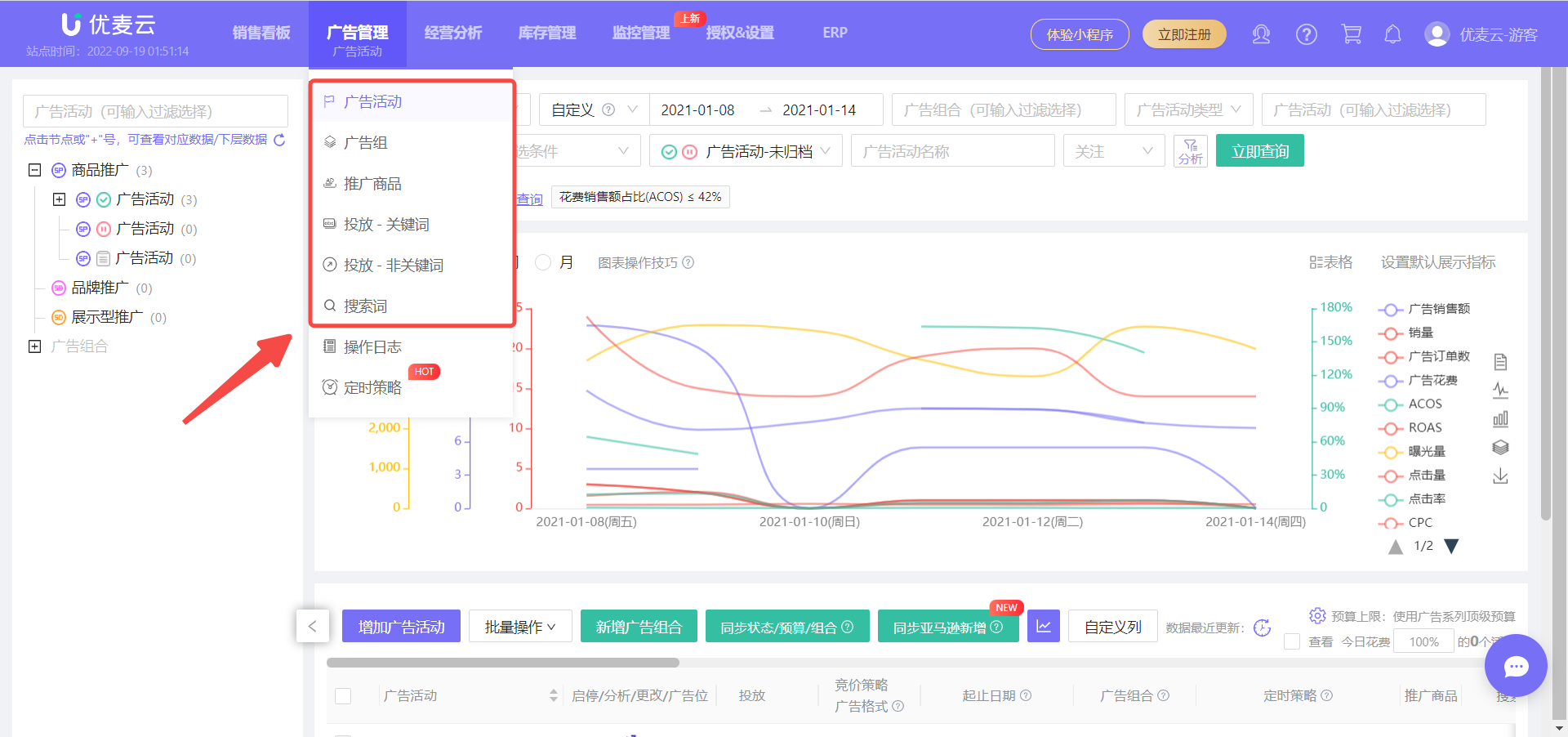
Unlike the display in Amazon Seller Central, SellerSpace directly integrates advertising data into six major modules: campaigns, Ad groups, Promoted Products, Targeting - Keywords, Targeting - Non-Keywords, Search Terms.
Sellers can directly analyze corresponding advertising performance data and adjust ad budgets, bids, ad placements, etc., based on the analysis results. Adjusted data is synchronized to Amazon Seller Central in real-time, providing a one-stop solution from analysis to adjustment!
 +
+
Scheduled Strategies
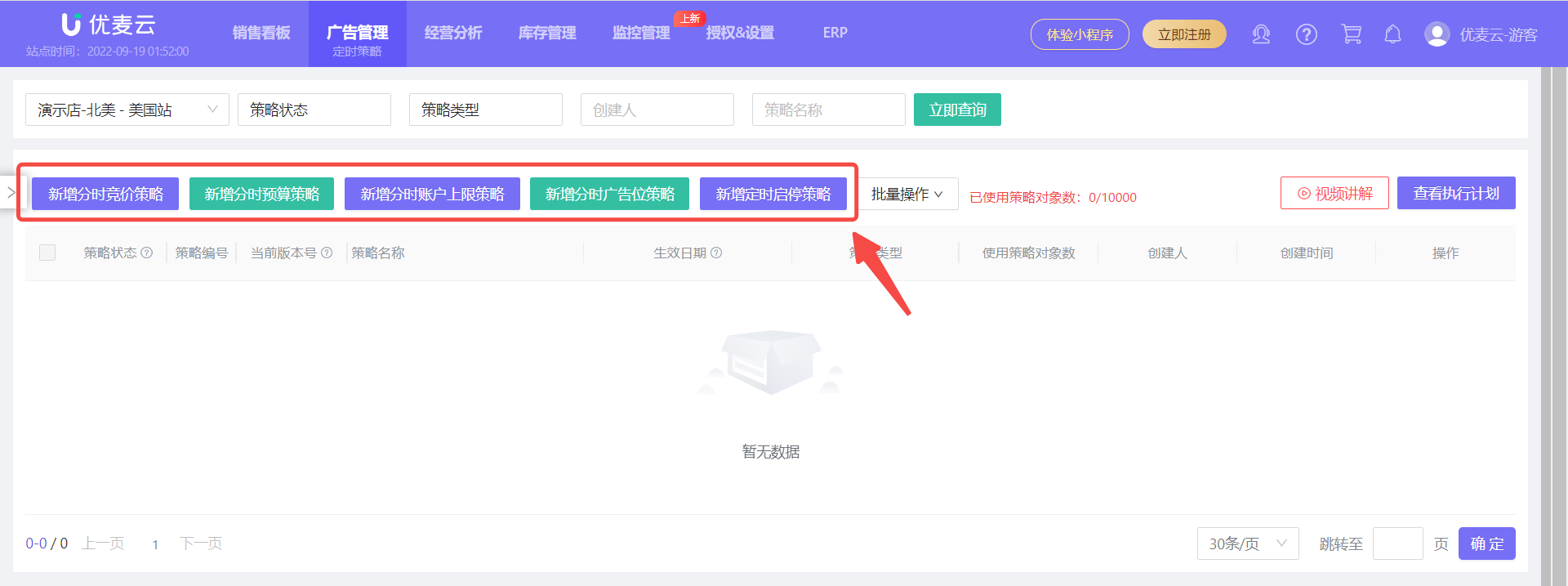
Advertising **Scheduled Strategies** are a unique feature of the SellerSpace system that can help sellers schedule ad campaigns for more precise spending, ensuring every dollar is used effectively.
**Scheduled Strategies** include five strategies: Bid Strategy, Budget Strategy, Budget Cap Strategy, Placement Bid Adjustment Strategy and Enable/Pause Strategy. Click here to see how to set up scheduled campaigns
 +
+
Operation Logs
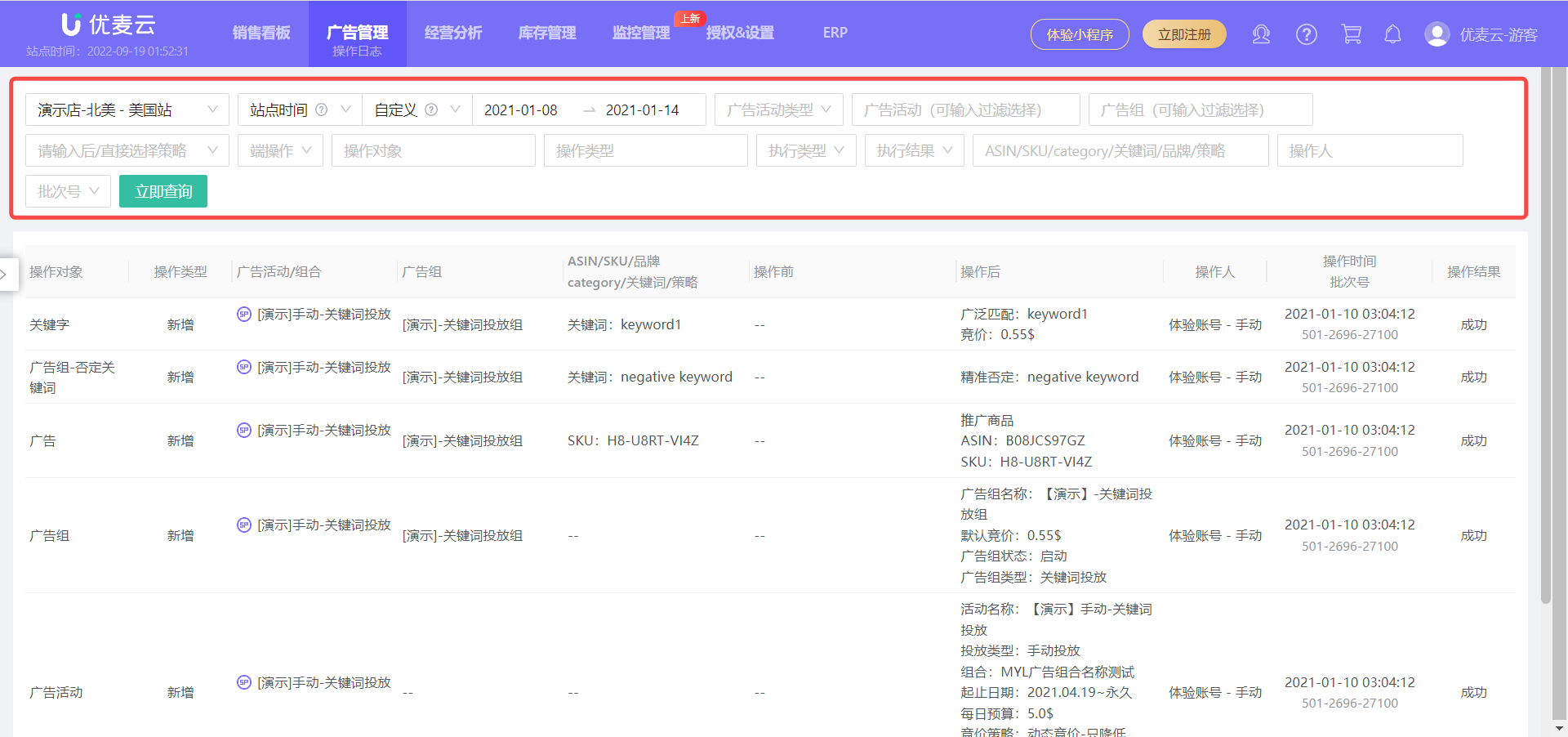
All advertising adjustment records are synchronized and saved in the SellerSpace system. This helps sellers analyze advertising optimization effectiveness, including the operator and operation results, enabling sellers to better manage ad campaigns.
 +
+
IV. Tree Navigation
Because we directly categorize and display Amazon advertising data from a data dimension perspective, which is different from the advertising display method in Amazon Seller Central, many sellers who are accustomed to Amazon Seller Central may find it unfamiliar and report that they cannot find the ads they want to view.
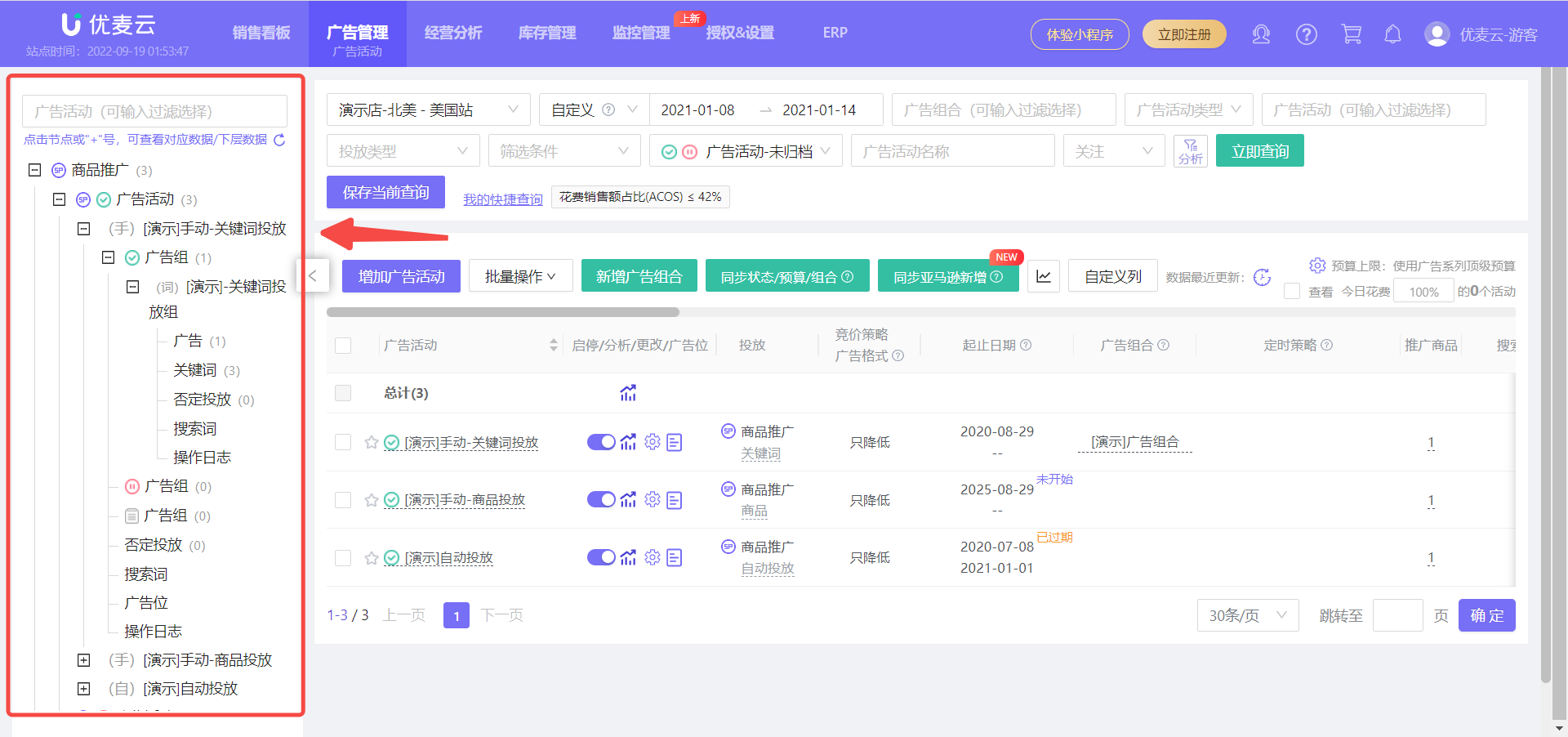
Therefore, we developed the "Tree Navigation" feature, referencing the advertising display method in Amazon Seller Central, to help you quickly locate the ads you want to view!
The tree navigation feature can be found on the right side of each advertising function module. Click a node to view the corresponding advertising data, and click the 【+】 sign to expand and view the next level of advertising data.
 +
+
V. How to Use
campaigns - Tutorial with Images and Text
Ad groups - Tutorial with Images and Text
Promoted Products - Tutorial with Images and Text
Targeting - Keywords - Tutorial with Images and Text
Targeting - Non-Keywords - Tutorial with Images and Text
Targeting - Negative - Tutorial with Images and Text
Search Terms - Tutorial with Images and Text
Buying Other ASINs - Tutorial with Images and Text
Scheduled Strategies - Tutorial with Images and Text
Automation Strategies - Tutorial with Images and Text
Keyword Library/Product Library - Tutorial with Images and Text
Operation Logs - Tutorial with Images and Text
